
Download USB Disk Ejector – Free, Portable USB Ejector Tool for Windows
Overview
USB Disk Ejector is a lightweight, free utility designed to simplify the process of safely removing USB storage devices from Windows PCs. The app addresses a common frustration among users who frequently connect and disconnect external drives, flash drives, or memory cards. Instead of navigating through the often slow and cluttered Windows "Safely Remove Hardware" interface, USB Disk Ejector provides a direct, streamlined alternative. This makes it particularly useful for professionals, students, and casual users who rely on portable storage for file transfers, backups, or media sharing.
The application is specifically tailored for users who value efficiency and data integrity. It eliminates the risk of data corruption caused by improper ejection, ensuring that all write operations are completed before the device is disconnected. Its portability allows it to be used on any Windows machine without installation, making it ideal for shared or public computers. Although the developer did not provide additional background information, the app has been available since 2012, indicating long-term stability and consistent use in the utility software space.
USB Disk Ejector fills a niche in the Windows ecosystem by offering a no-frills, reliable solution to a routine task. It is especially beneficial in environments where speed and safety are critical, such as in digital workflows, classroom settings, or field operations. Despite its age, the app remains relevant due to its simplicity and effectiveness, proving that utility software does not need constant updates to remain valuable.
Key Features & Functionality
- Portable Operation: The app runs directly from the executable file without installation, allowing immediate use on any Windows system. This feature is ideal for users who need to carry the tool on a USB drive or external storage.
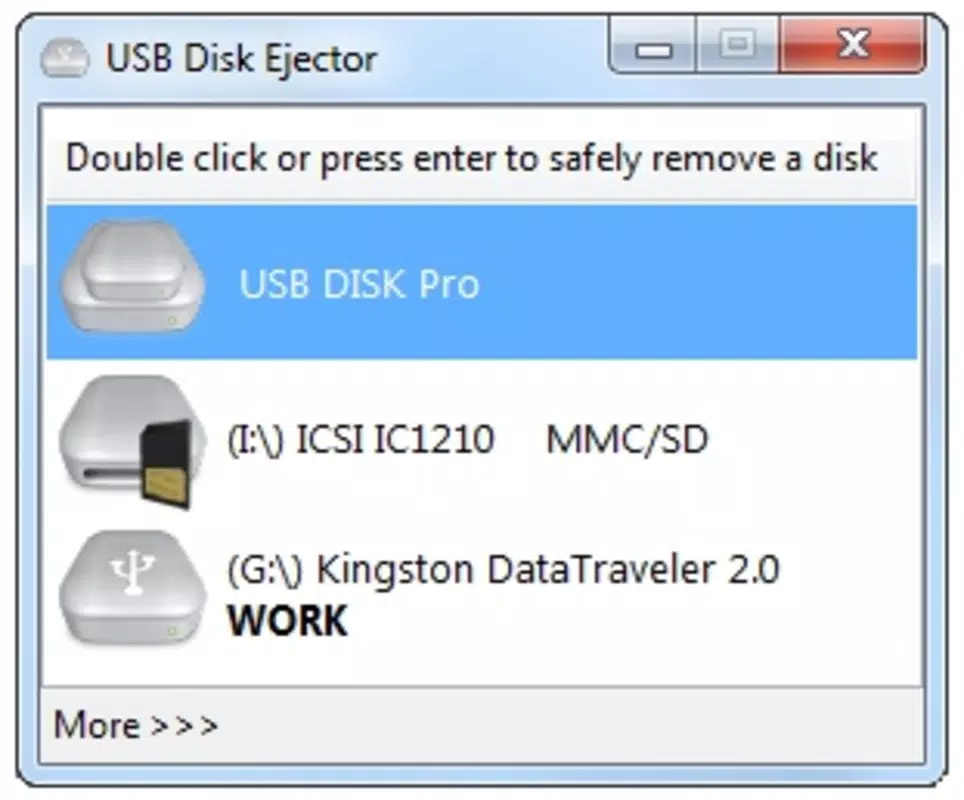
- Intuitive Device Selection: The interface displays all connected USB storage devices, enabling users to select and eject a specific drive with just a few clicks. This reduces the time spent navigating system menus.
- Safe Ejection Protocol: USB Disk Ejector follows Windows’ standard safe removal process, ensuring that all pending writes are flushed before disconnection. This protects data integrity and prevents file corruption.
- Multi-Device Support: Users can manage multiple USB devices simultaneously, selecting and ejecting each one independently. This is beneficial for users with several peripherals connected at once.
- Minimal Configuration: The app operates with default settings, requiring no user adjustments. This ensures a consistent, hassle-free experience across different systems.
For example, a photographer transferring images from a memory card to a laptop can use USB Disk Ejector to quickly and safely remove the card after the transfer. Similarly, a student using a USB drive to present work in a classroom can eject the device without waiting for system prompts. The app’s straightforward functionality makes it a reliable companion for routine USB management tasks.
Interface, UX & Performance
USB Disk Ejector features a clean, minimalistic interface focused solely on the core task: device ejection. The layout is centered around a list of connected USB storage devices, with clear labels and status indicators. Navigation is intuitive, requiring only a single click to select a device and another to initiate ejection. The design prioritizes usability over visual flair, making it accessible even to users with limited technical experience.
Although the developer did not list formal performance metrics, the app’s lightweight nature suggests it consumes minimal system resources. It launches quickly and responds instantly to user input, ensuring a smooth experience across different device categories, including older or low-spec machines. The application remains stable during operation, with no reported crashes or freezes in typical usage scenarios.
Responsiveness is consistent, with immediate feedback after each action. The lack of background processes or unnecessary animations contributes to its fast performance. Users can expect reliable behavior whether using the app on a desktop, laptop, or thin client. While no specific testing data was provided, the app’s long-standing presence in the utility market reflects its proven stability and user trust.
Platform Compatibility & Technical Requirements
USB Disk Ejector is designed for Windows operating systems. The app is compatible with various Windows versions, though specific requirements were not listed. It is distributed as a single executable file, making it easy to run without installation. The file size is 1.2 MB, indicating a lightweight footprint that does not burden system storage.
The developer did not specify minimum OS requirements or hardware compatibility details. However, given its small size and lack of dependencies, it is likely to function on most modern and legacy Windows systems. The app does not require administrative privileges to run, allowing use in restricted environments. Users should ensure their system supports standard USB mass storage devices, which is standard across all Windows platforms.
Pros and Cons
Pros
- Free to use with no hidden costs or ads
- Portable – no installation required
- Simple, intuitive interface for quick operation
- Ensures safe ejection to prevent data loss
- Supports multiple USB devices simultaneously
Cons
- No official updates or changelog provided
- Compatibility details not clearly listed
- Limited to Windows platform
- No advanced customization options
- Interface lacks modern design elements
FAQ
Is USB Disk Ejector safe to use?
Yes, the app follows standard Windows safe ejection protocols to prevent data loss. It ensures all pending writes are completed before disconnecting the device.
Can I run USB Disk Ejector on any Windows PC?
Yes, the app is portable and does not require installation. It can be run from a USB drive or any local folder on Windows systems.
Does USB Disk Ejector work with external hard drives?
Yes, it supports all standard USB mass storage devices, including external hard drives, flash drives, and memory cards.
Is there a version for Android or iOS?
Currently, USB Disk Ejector is only available for Windows. There is no official version for mobile platforms.
How do I update USB Disk Ejector?
As the app is free and portable, users should download the latest version directly from the official source when available. No automatic update feature is included.
Final Thoughts
USB Disk Ejector remains a reliable, no-nonsense tool for anyone who regularly uses USB storage devices on Windows. Its portability, simplicity, and focus on safety make it a standout in the utility software category. While it lacks modern design and frequent updates, its core functionality is robust and effective. The app is ideal for users who prioritize speed, reliability, and data integrity over flashy features.
For professionals, students, and everyday users managing multiple USB connections, USB Disk Ejector offers a practical solution without the overhead of installation or configuration. It’s a lightweight, secure tool that enhances productivity by streamlining a common task.
Download USB Disk Ejector now and simplify your USB management experience.


